
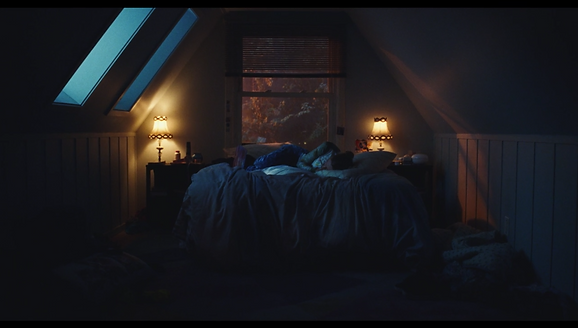

For this project, I chose a shot from Euphoria a tried to match the lighting and mood of the scene. The cinematographer is Marcell Rév.
This project was mainly modeled in Maya. Some objects were modeled in Houdini. Rendered with Arnold. Color corrections done in Nuke. Matte paintings and textures done in Photoshop.
Below are mood changes for this scene along with my process/progress photos that were taken along the way. This is still a work in progress and better renders along with a video will be uploaded soon.
Mood Changes


Night Time / Original Mood Match Process
The first thing I did was analyze the original image. Making the image lighter helped me see everything better. I used the walls and objects in the room to find the perspective. I also outlined simple shapes in the scene so they would stand out when brought into Maya. The bottom 2 images are a color study and another analysis done for smaller details.


The top left image was a render from very early on. It took me a while to figure out the positioning of all the lights so that I got the orange light with the proper shadows. I also had to play with the lights on the outside of the left windows so that they seemed like they were kind of bright from the window, but really didn't light up the room that much. The middle is after I realized that my camera was a little off, so I fixed that along with the windows. I also played around with NCloth so I actually had something on the bed. Top right is where I was back on track with lighting and the scene was actually starting to look good. Bottom left is after I learned you can add pressure to the NCloth to add thickness. This helped me out a lot when making the pillow.For the bottom middle, I added a lot to the scene to help with the mood of a sad teenagers room. The bottom right is the final (for now). I adjusted the carpet shader so it wasn't catching as much light, but I feel I can push that further. I also adjusted the shader for the wall on the right so it did the same thing. I think the light coming from the window needs a ramp so it fades out the further it gets from the light. For the future render, I'm going to play with the right lamp and the light given from it. I also want to make the blanket smoother and give the pillows more of a used feel. I'm also going to adjust the placement of the texture outside of the window. I placed it on a half sphere instead of a plane so when the camera moved, it wouldn't be flat, but I like the original placement better.


Picking a shot from a show was very helpful when modeling and making shaders and textures for the different objects in the room. I was able to get a good amount of references to help me figure out the different objects in the room and what their true colors were.
Mood Change 1: Day Time
Of course, my first idea for the mood change was to make it a day time scene. I found a reference from the show and worked from that. At first I had just thrown an HDRI into the scene to see how it would look, and I liked it so I stuck with it. The only thing I would have to change was the matte painting behind the window. The second image shows the first matte painting I did. For both the day and night matte paintings, I took a piece from the reference and built from it. The second image also shows where I was in the process of further building the environment. I left out certain floor objects that made the room feel messy along with the wrinkled blanket to change the mood further. I ended up running into render issues due the HDRI. It caused so much noise and was taking way too long to render. I decided to get rid of it and use a spot light instead. You can see the changes in the third image. The lighting matches the reference better and I really like the way the light hits the bed and just slightly touches the chair and pillow on the floor. I also redid the matte painting and adjusted the floor shader.


Mood Change 2: Toon Shader
For this mood change, I decided to go back to the messy room look and experiment with the Arnold toon shader. My inspiration for this one was Spider-Man: Into the Spider-Verse. I used the same light positions I had for the night time scene and turned one of the lamps off. I created a gobo with a ramp connected to add a gradient of color to the lights. I wasn't finished modeling when the first render was done, but I felt the overall scene was too dark. I also didn't like the colors from the light. I spread out the colors of the gradient so I was getting more pink and added an area light to the scene. Outside of each window is half of a sphere with a gradient connected to it. The image on the right looks much closer to the reference. The final version will have all the changes done to the night time scene along with greater attention paid the way the light is hitting the front left window.


Source Images
The first 2 images on the top row are from Pexels and were used to create the textures made in Photoshop that would be placed on the half spheres outside of the window. The bottom row of images were also made in Photoshop and were used to texture the pillows on the bed, the pillow on the floor, and the carpet.


